

Shaker Easter Card SVG
Looking for an Easter card to make with your Cricut? If so, then you’ll love this shaker Easter card SVG and coordinating envelope design. Fill This card with glitter for a fun shaker card. Or you can leave the shaker part off if you want something more simple.

I also have a lot of other fun Easter crafts like these adorable Easter baskets if you are looking for something to fill with treats and goodies. Or you may want to try these popular Easter candy holders.
You can also view all of my free Easter SVG files and craft tutorials for more Easter craft ideas.

Download the Easter Card SVG File
You can download these free Easter card SVG from my members only free library (design #30 under Card Templates or search “Easter card SVG”).
Don’t have a password? Unlock my free members library by entering your name and email in the form below or click here.
Supplies Needed
- Medium Weight Cardstock in a variety of colors – this is a great variety pack for making cards and other paper crafts.
- Decorative paper – you can find adorable Easter paper here or by the sheet at Hobby Lobby and Michaels.
- .007 clear craft plastic sheets – this is what I am using
- 2mm craft foam which I picked up from Hobby Lobby, but you can also purchase it here.
- Chunky Glitter and/or sequins
- 0.5 inch white pom poms (optional for bunny tails).
- Fine Point Cricut Pens – this ultimate pen set is such a great deal
- A good craft glue – this Bearly Art craft glue is what I am using.
- Foam Dots (optional)
- Scoring Stylus (which is what I will be using in this tutorial with the Explore) or Scoring Wheel (Maker only). Or you can fold by hand.
- Cricut Maker or Explore Cutting Machine and a cutting mat.
- Easter Card SVG (available in my free members library design #4 under Easter Files —get the password by filling out the form here.)
Share the love and easily come back to this Shaker Card tutorial anytime just by saving this on Pinterest!

Shaker Easter Card Instructions
Follow along with the tutorial below and make sure to post these in my crafting group here or tag me if you post them on social media. I absolutely love seeing your crafts and can’t wait to see how your Easter cards turn out.
Step 1: Upload Easter Card SVG File to Cricut Design Space
Upload the Easter card SVG file to Cricut Design Space. For help with uploading SVG files, check out my tutorial here.
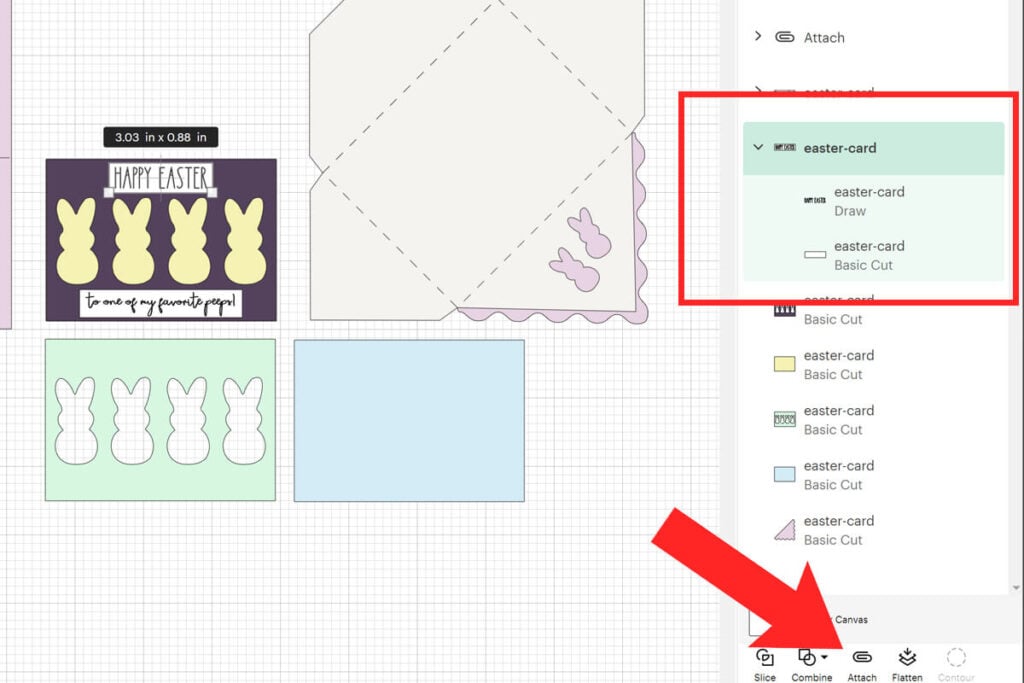
Click on “Ungroup” to ungroup all of your layers. You will need to change the line on top of the card layer and envelope layer to “Score”. To do this, select the rectangle on top of the envelope and select “Score” in the operation menu.

Then select those score lines and your envelope layer together and select “Attach” to attach these together. Repeat these steps for the line on top of your card as well.

Next, change the 2 text layers to pen. To do this, select Happy Easter and then change the operation from “Basic Cut” to “Pen”. Repeat this for “to one of my favorite peeps!

Then, attach each of the pen layers to the white rectangle underneath it. So select Happy Easter and the white rectangle together, and select “Attach”. Repeat this for the other pen layer.
Step 2: Cut
Cut out your card pieces. Remember to add your scoring stylus or wheel as prompted. You will also need a deep point blade when cutting the clear plastic and craft foam.
- Cut the blue layer with the transparent plastic
- Cut the green layer with the craft foam
Note: If you don’t want to make a shaker card, delete the foam and transparent layers and you can make a regular card instead.
Step 3: Fold & Glue Craft Foam
First, glue the foam on top of the rectangle piece that you cut out. Then, fold your card in half on the score line and glue the craft foam on top to the front of the card. The foam should face the correct direction when glued down.
Note: Before gluing, line up all of your layers to make sure everything is facing the correct direction.

Step 4: Fill With Glitter
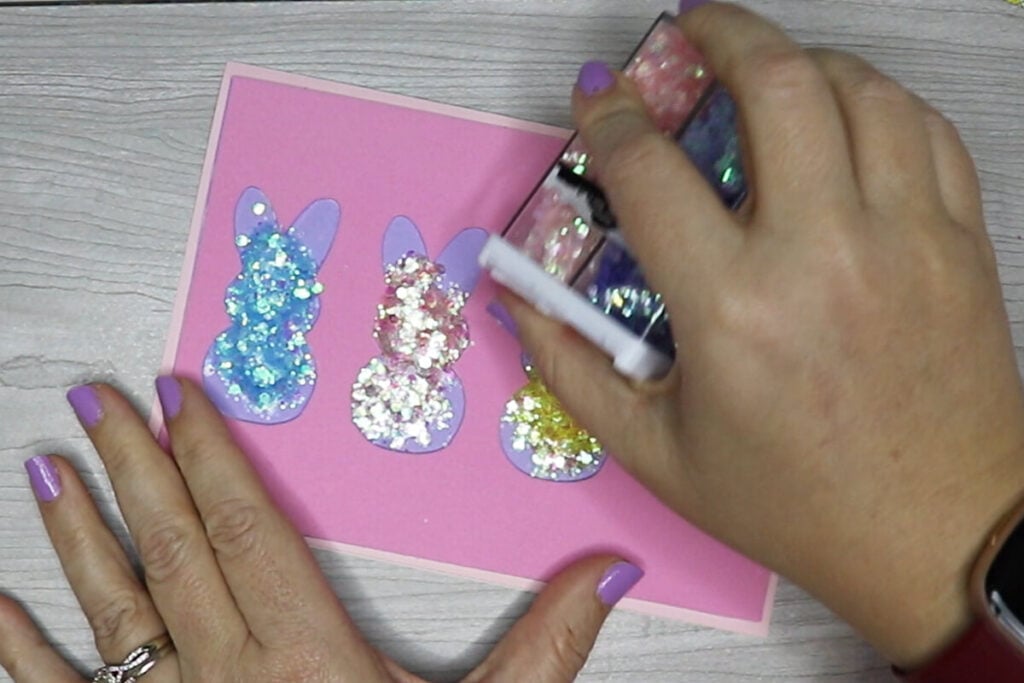
Fill the bunnies on the foam layer with glitter and/or small sequins. Then, wipe any extra glitter off of the foam before moving to the next step.
Step 5: Add Transparency Window on Top
Next, glue the clear plastic piece on top top and the top layer of your card on top of that. Add the words to your card by either gluing them on or use foam dots for more of an elevated look like I am using.

Step 6: Glue on Bunny Tails
If you really want to take this card to the next level with cuteness, then add small white pom poms to your bunnies. I found that using hot glue worked best for gluing the pom poms to the plastic.

And your Easter card is ready to go! There is an envelope template that goes with this. For help with assembling the envelope, you can check out the video tutorial below or my envelope template tutorial.
When you’re done, make sure to post these in my crafting group here or tag me if you post them on social media. I would love to see how yours come out!
Video Tutorial For Cricut Easter Card
Watch the step-by-step video tutorial to learn how to make this super cute Bunny Easter card here:

