Glow in the Dark Vinyl Cricut Project Ideas
Make your crafts stand out by using glow in the dark vinyl with your Cricut! You can easily replace any color in your projects with glow in the dark vinyl for a fun effect. And today I’m going to show you some of the projects that I love using this vinyl for. I’ll also include the free SVG files for these projects.

If you’ve never used glow in the dark vinyl with your Cricut, you’re definitely missing out! It’s just a lot of fun and why not try all the cool crafts with your Cricut? Out of all the glow in the dark HTV that I’ve tried, this Siser Glow in the Dark vinyl is by far my favorite. It glows super bright and the glow lasts awhile.
How To Use Cricut Glow in the Dark Vinyl
Cricut glow in the dark vinyl is just another type of iron on vinyl. So you’ll apply this just like you would regular iron on vinyl. But, I’m going to walk you through the settings because glow in the dark vinyl is fun to use on all surfaces… fabric, wood and paper!!
But, just remember that with any glow in the dark product, it does take light to charge it. So if your glow isn’t that bright, just give it a few minutes under a light. And like I mentioned before, this Siser Glow in the Dark vinyl is going to give you a super bright glow.
Cutting Glow in the Dark Vinyl
When cutting glow in the dark vinyl, you need to make sure that you mirror your designs just like you would for regular htv. In the Mat Preview, make sure to turn on the mirror function. Do this for the glow in the dark layer and all layers that you are using iron on vinyl for. You will need to click on each layer to turn this on for each layer.

When cutting iron on vinyl, i use the iron on vinyl cut setting in Cricut. I keep this on the default pressure and it works great. But, I recommend doing a test cut first. If you don’t feel like this cut all the way through enough, then change the pressure to “more”. Depending on how new your blade it, this can effect which setting you need.
How to Heat Press Glow in the Dark Vinyl
You will press this type of vinyl just the same as you do for regular iron on vinyl. When pressing any type of vinyl, I recommend using a heat press versus an iron. This will give you much better results and your project will last longer. I either use this 12×10 Cricut Easy Press or this mini heat press for smaller projects and cardstock.
Before pressing the glow vinyl down, make sure that you weed all the extra pieces out from your design. Then place your design on the material you are using and follow these settings:
If using the Cricut EasyPress
- For fabrics, press at 305 degrees for 30 seconds. Remove liner when cool to the touch.
- For wood, press at 305 degrees for 30 seconds using parchment paper. Remove liner when cool to the touch.
- For cardstock, press at 305 degrees for 10 seconds. Remove liner when cool to the touch.
If using the Cricut EasyPress Mini
- For fabrics, press on Medium heat for 30 seconds with constant movement and firm pressure. Remove liner when cool to the touch.
- For wood, press on Medium heat for 40 seconds with constant movement and firm pressure. Remove liner when cool to the touch.
- For cardstock, press on Medium heat for 10 seconds with constant movement and light pressure. Remove liner when cool to the touch.
Ideas for Glow in the Dark Cricut Crafts with Free SVG Files
So now that you now how to apply glow vinyl, the question is, what do I want to make glow in the dark? Well, pretty much anything for Halloween is great when it glows. And also, anything for kids. Kids love glow in the dark year round. So to help you get creative with ideas, I’m going to show you some of the ways I’ve been using glow in the dark vinyl.
Make Shirts , Totes and other Fabric Glow in the Dark
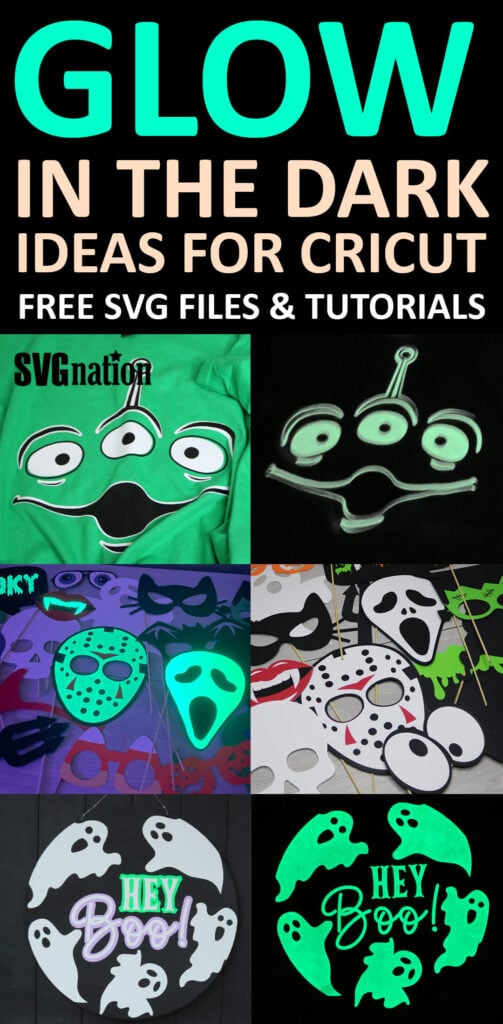
I’m going to start with the obvious first and that is… make glow in the dark shirts. Glow in the dark shirts are fun for kids year round. And this is also a great way to turn a simple costume into something even more cool, like these alien shirts I recently created for a futuristic party.

Want to use this alien SVG? You can download this free from my members only free library (design #1 under Shirt SVG Files or search “Alien Face”).
Don’t have a password? Unlock my free members library by entering your name and email in the form below or click here.
Other shirts that I have made using Siser Glow in the Dark vinyl are themed shirts for Friday night football games… like a batgirl shirt using the symbol to glow and Halloween shirts.
Here are some of my free SVG designs that work great with glow in the dark vinyl:
- Couples Halloween Shirts
- Trick or Treat SVG (make your Halloween bag glow)
- Spooky SVG
- Jack-o-lantern face SVG (use it for the yellow)
- Game Day Vibes SVG (make the face glow)
- Dancing Skeletons SVG
- Skeleton SVG
- Red, White & Boozy (make the stars glow)
- New Year, Same Hot Mess (glow into the New Year)
- Birthday Dude SVG
- Scary Clown Face (make the eyes glow)
- There’s SO many more! View all of my Shirt SVG files here.
Use for Indoor/Outdoor Signs
Since glow products charge in the light or sunlight, using glow in the dark vinyl on outdoor signs is a great idea! This way your sign can charge during the day (but still be super cute) and glow at night. Follow along with this Halloween sign tutorial if you want to make this sign for Halloween.
For more welcome sign ideas and free SVG files, search all of my wood craft Cricut ideas.

Make Photo Booth Props Glow
A lot of people don’t realize that you can use iron on vinyl on cardstock. But, you can and it’s super simple. Which means that you can make any cardstock project glow in the dark as well.
These Halloween photo booth props are just one of the ways to add some glow to your cardstock projects. But, you can find a lot more Halloween cardstock projects that will look great glowing on my blog. And here are some more photo booth prop SVG files if you want to make all your photo booth props glow!

When you’re done, make sure to post your crafts in my crafting group here or tag me if you post them on social media. I absolutely love seeing your crafts and can’t wait to see your glow in the dark creations!
Save for Later!
Share the love and easily come back to this Glow in the Dark Vinyl tutorial anytime just by saving this on Pinterest… Plus this helps to keep my SVG files and Cricut tutorials free 🙂