

Christmas Gift Tag SVG
Use your Cricut to whip up adorable Christmas gift tags that can be resized to fit any gift you need this holiday season.
If you love adding a personal touch to your holiday wrapping, then you’ll love these Christmas gift tags. These designs are layered, but you can also print them out if you need last minute gift tags that are super quick and easy to make. Just grab the free Christmas gifts tag SVG or PDF if you don’t have a cutting machine and follow along with the tutorial.

This post contains some affiliate links for your convenience (which means if you make a purchase after clicking a link I will earn a small commission but it won’t cost you a penny more)! Read my full disclosure policy.
Need a card to go with your gift? Find multiple Christmas Card SVG designs in my card design collection. Or, if you are looking for more variety for your gift tags, then try these snow globe shaker gift tags.
To Make these Christmas Gift Tags, You Will Need:
- Medium Weight Cardstock. You can find all the colors you need in this variety pack.
- I am also using this diamond white glitter paper which can be written on!
- Cricut Pens – I have this pack so I always have the color I need on hand.
- String or Twine – I am using this red and white twine
- A good paper craft glue that dries clear – this Bearly Art craft glue is what I am using.
- Cutting Machine – I am using the Cricut Explore model
- Printer if printing instead
- Printing paper if printing, I absolutely love this white diamond printer paper for these tags!
Download the Christmas Gift Tag SVG
You can download this free Christmas Tag SVG from my members only free library (design #7 under Christmas Crafts or search “Christmas Gift Tag SVG”).
Don’t have a password? Unlock my free members library by entering your name and email in the form below or click here.
Save this on Pinterest so you can easily find this tutorial when you need it… Plus by sharing with others, this helps to keep my SVG files and Cricut tutorials free!

Layered Christmas Gift Tag Tutorial using a Cricut
Step 1: Upload the Christmas Gift Tag SVG to Cricut Design Space
Upload the Christmas gift tag SVG to Cricut Design Space. If you need help with uploading SVG files, then check out my tutorial here. Then click on “Ungroup” to ungroup the layers.
Step2: Modify Text to the Pen Operation
Select one of the gift tags and open the group in the layers panel. Then open the group at the bottom and select the layer with the text “to, from” on it. Change the operation of this layer to Pen.

Then click on the group with the pen layer and the tag below it and select “Attach” or the paperclip to attach the pen to the tag. This is what lets Cricut know where to write and cut on the paper.

Repeat this step for each of the tags and then cut them out. Make sure to add your pen to your Cricut.
Step 3: Assemble the Gift Tags
Each gift tags has 3 layers and some of them have additional pieces. To assemble these, start by gluing the 3 layers together. The layer with the To and From is the bottom layer. Then add the second layer and the 3rd. If the design has additional pieces, glue these to the top layer. The image below shows the order of the layers for each tag.
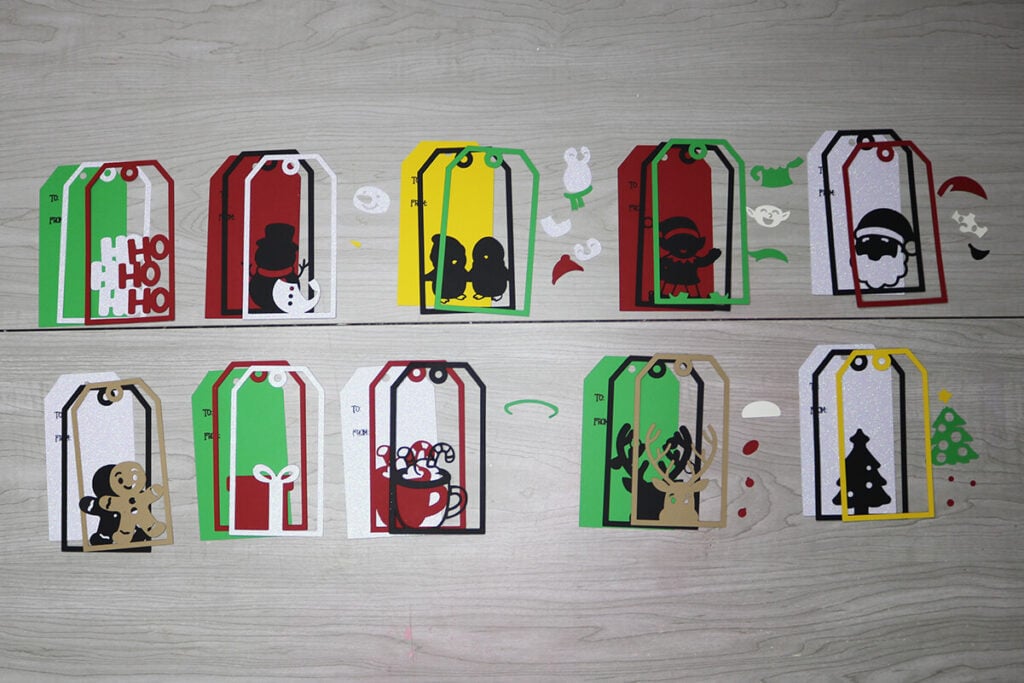
Last, add your string. I like to loop the string in the gift tag, but you can add this your favorite way.

Make a Giant Gift Tag!
You can resize this gift tag size to 11.5″ in the height (or larger if you have the longer size cardstock) making it perfect for those larger gifts that you can’t find tags big enough for.

Christmas Gift Tag Tutorial using Print then Cut with Cricut
If you choose to print then cut the Christmas gift tags, these tips are going to be important to make sure they come out looking their best.
Step 1: Upload the Christmas Gift Tag SVG to Cricut Design Space
Upload the Christmas gift tag SVG to Cricut Design Space. Then click on “Ungroup” to ungroup the layers.
Step 2: Adjust the Text Layer and Then Flatten the Image
Typically, you would just need to flatten the image, but because this text was chosen to work well with the Cricut pens, it doesn’t do well with the print then cut. But, a hack for this is to change the text layer to pen first and then flatten.
First, open the group for one of the gift tags. Then open the group at the bottom and select the layer with the text “to, from” on it. Change the operation of this layer to Pen. Then select all the layers in the gift tag and select “Flatten”. You will need to repeat this for each of the gift tags.

Step 3: Recommended Sizing
To make the most out of your paper, I recommend resizing these gift tags a little small. To fit 6 gift tags on one sheet of paper, select all 100 of the gift tags together (placed exactly where they were when you uploaded the file) and change the W to 11.5″. Make sure the proportions is locked so the height automatically adjusts. Then duplicate 2 of the tags so the second sheet of paper has 6 as well.

Step 4: Printing and Cutting
Select Make when you are ready to print your Christmas tags. View the mat preview and make sure this looks correct. You should see Print Then Cut next to your mat.

Select “Continue” and then on the next screen, select “Send to Printer”. Select your printer, toggle on “Add Bleed” (this is optional, but the settings that I prefer). Then select “Print” to print out your designs.

Place the cut out design on your Cricut mat, face up and select your cut settings. Then let your Cricut cut everything out!
Note: If you are having trouble with the Print then Cut, make sure that you have the correct paper on your cutting mat that shows on the screen and your mat looks identical to the mat in Cricut Design Space. Also make sure that you have very good lighting. Try shining a flashlight at the Cricut if your area isn’t well lit.
Step 5: Add the String
Just loop your string into the holes however you want and your Christmas gift tags are done. This method is super quick and easy so you can make up a bunch of these for all the gifts that you have this year.

Print the Christmas Tags with the PDF
There is also a PDF file included so if you don’t have a cutting machine, you can still make these gift tags. You’ll just need a hole punch to add the hole for the string. This is a great hole punch set because it comes with 2 different sizes so you can decide which size is right for you based on your string.

Thanks so much for checking out this Christmas gift tag tutorial. When you’re done making your gift tags, make sure to post these in my crafting group here or tag me if you post them on social media. I absolutely love seeing your crafts and definitely want to see the giant tags you are making.
Video Tutorial For Christmas Gift Tags
Watch the step-by-step tutorial to learn how to make these Christmas gift tags here:

