

Movie Popcorn Gift Card Holder Template
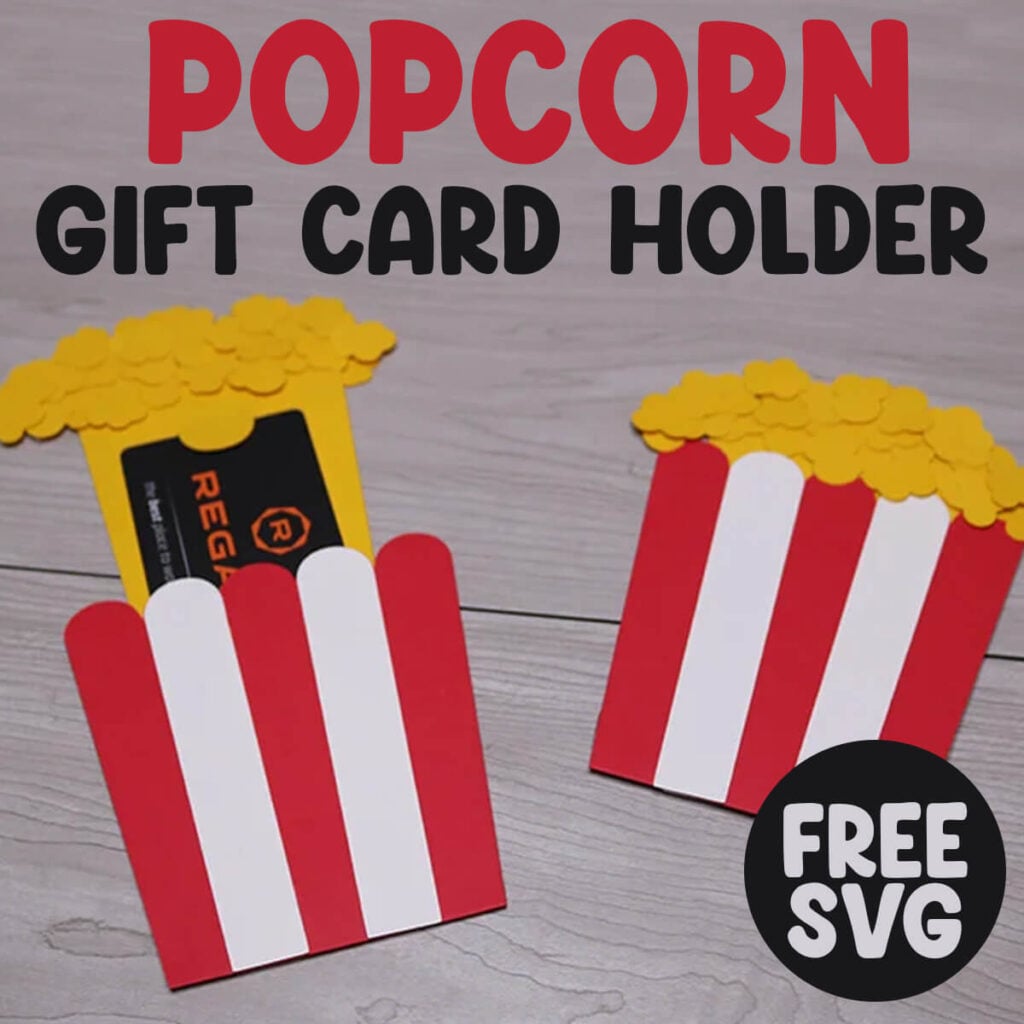
Give your next movie night, teacher gift, or birthday surprise a fun twist with this adorable Popcorn Gift Card Holder SVG. This easy‑to‑cut popcorn template works perfectly with Cricut, Silhouette, and other cutting machines, making it a quick, creative way to package gift cards for kids, teachers, coworkers, and popcorn lovers of all ages.
This post contains some affiliate links for your convenience. (Which means if you make a purchase after clicking a link I will earn a small commission but it won’t cost you a penny more)! Read my full disclosure policy.
Looking for more creative ways to dress up a gift card? I’ve got a whole lineup of easy gift card holder SVGs waiting for you.
Learn how to make a Popcorn Gift Card Holder
The layered popcorn design cuts clean, assembles fast, and delivers that instant “aww, that’s so cute” moment your handmade gifts are known for. Whether you’re crafting for a classroom reward, a movie‑themed party, or your small shop, this popcorn SVG is a crowd‑pleaser that’s ready to pop.
Watch the full step-by-step video tutorial on how to make this popcorn gift card holder with your Cricut here:

To Make these DIY Photo Cards, You Will Need:
To make this popcorn gift card holder, you will need:
- Medium weight cardstock in red, white and an orange/yellow – You can find all of these colors in this variety pack of cardstock.
- Crafting glue or glue stick.
- Cricut Maker or Explore Cutting Machine and your cutting mat.
- Scoring Stylus (which is what I will be using in this tutorial) or Scoring Wheel (Maker only).
- *Optional – Cricut Pens for writing on your gift card holder.
Download The Popcorn Gift Card Holder Template
You can download this free Popcorn Gift Card Holder Template from my members only free library (design #4 under Gift Card Holders or search “Gift Card Holder SVG”).
Don’t have a password? Unlock my free members library here.
Share the love and easily come back to this tutorial anytime just by saving this on Pinterest… Plus this helps to keep my SVG files and Cricut tutorials free!

Step 1: Upload Popcorn SVG File & Add Score Line
First, upload the Popcorn SVG file to Cricut Design Space. Before adding your score line (or making any edits), you will need to Ungroup your Layers. With all your layers selected, click on “ungroup”.

If you do not have a scoring tool, you can skip the next step with adding your score line. I highly recommend using a Scoring Stylus or Scoring Wheel (maker only) as this will make sure your fold is perfectly center.
Select your score line from the Shapes Menu. Then rotate your score line so it is horizontal. If the line isn’t set to score, you can change this in the operations menu in your top toolbar.

Place your score line on top of the popcorn box. Select both your score line and popcorn box together by holding down shift. Then, select Center Vertically from the Align Menu.
Note: It may help to hide the white layers on top of the popcorn box while doing this. Just make sure to add them back once you have attached your score line.
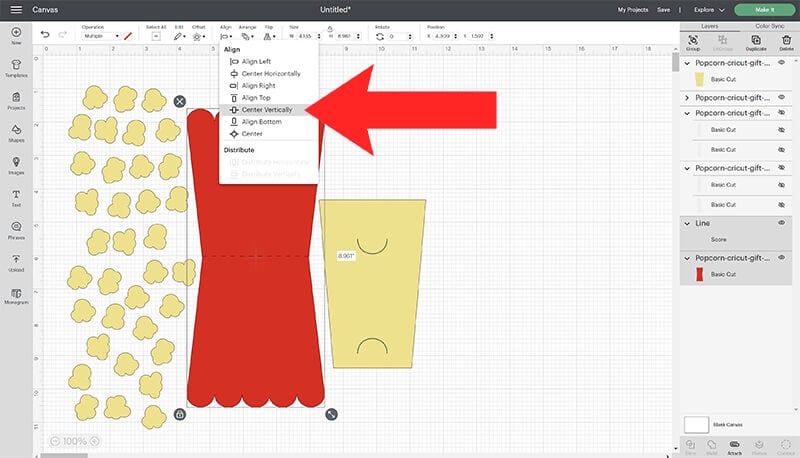
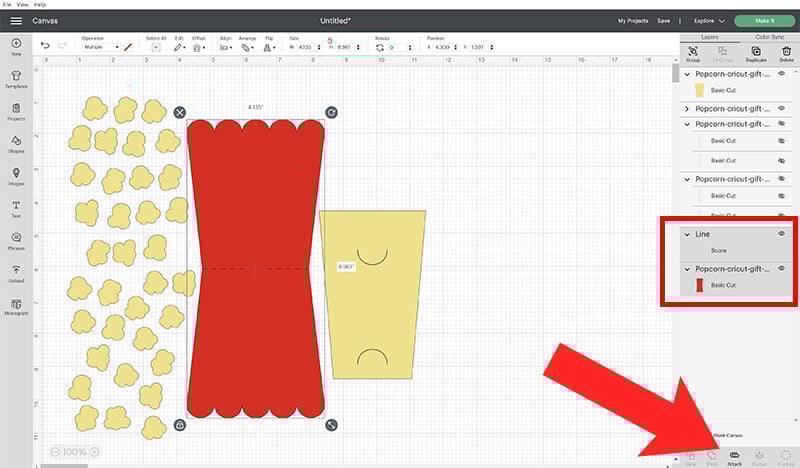
While you have both the score line and popcorn box layers selected, click on Attach to attach your score line to your popcorn gift card holder.
Step 2: Customize Popcorn Gift Card Holder with Cricut Writing Pens
You can use your Cricut to write a message on your gift card holder! To do this, start with creating your text. From the font menu, choose the font that you want to use.

When using the writing feature with your Cricut, your Cricut will write around your text in the same way that it would cut it. So, your words will be outlined unless you use a font specific for Cricut pens. These fonts are only available for free if you have a Cricut Access Subscription. To find fonts that are specific for using the Cricut pens, go to your Filter Menu and select the Writing option.

You don’t have to use one of the writing pens if you don’t have Cricut Access. If you use a thinner font and a thicker pen, then the outline will be less noticeable when using non writing fonts. That’s why I like using these Cricut Gel Pens, because they are thicker.
Once you select your font, resize your text and place it where you want it to go. Next, make sure to change your Operation from Cut to Pen. Repeat this for all of your text layers.

Then, click on the color fill to select your pen type and color.

The last step is to attach your text to your popcorn box, just as we did with the score line. This will let your Cricut know exactly where it needs to write on your paper. Just select your text layers and gift card layer together by holding down shift as you select them. And then select attach.

Step 3: Cut & Assemble Gift Card Holder
When you are ready to cut your gift card holder, select Make It. Follow the prompts to cut out each of your pieces. And follow the prompts for adding your scoring tools and pens if using these.
Once all of your pieces are cut out, assemble your gift card holder by folding your popcorn box in half. Add glue to just the edges of the box and glue your box together, leaving the top open. Then, glue the white popcorn details to each side of your popcorn box.

To add the popcorn to your box, start by inserting the yellow cut out into your popcorn box. Start gluing the popcorn to the top of your yellow piece. Continuing gluing on your popcorn pieces. Start overlapping them on top of each other to fill up your popcorn box.

Continuing gluing your popcorn on until you like the way it looks. Make sure that you do not glue the popcorn to the box. You need to be able to easily slide the popcorn layer in and out of the box. Then, flip your box over and glue popcorn to the back as well.
Since you don’t need to overlap the pieces as much on the back, you won’t need as many popcorn pieces for the back. Depending on how much popcorn you want, you may not use all the popcorn pieces, or you may need to cut more.
Once you are finished gluing the popcorn on, just add your gift card into the slots and it’s ready to go!
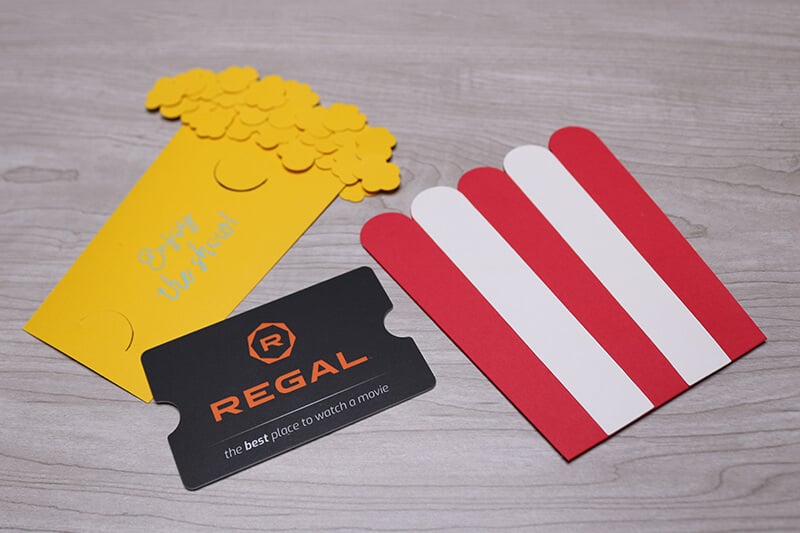
And that’s all it takes to make this adorable Popcorn Gift Card Holder come to life. It’s quick, it’s cute, and it’s one of those projects that instantly turns a simple gift card into something thoughtful and fun. Whether you’re crafting for a movie night, a teacher appreciation gift, or a birthday surprise, this popcorn SVG adds that perfect handmade touch.
